
Prior.Run
Prior.RunKnow before you build.
·
Design AuditExperiment 334
Design Audit·
17% would click the CTA83% would scroll or leave
v1 · Jun 4, 2026 · 3:39 PMOptimizing for: Conversion rate
Design Audit · Single Variant

Strong brand, but pricing fog and missing proof cost 83% of visitors.

Broad consumer audience — mix of tech-savvy and casual users, mobile and desktop

Persona template: General Consumer

17%
would click the CTA
83% would scroll or leave — mostly looking for full pricing tiers, post-signup clarity, and trust signals before committing
Confidence

HighClear hesitation patterns across trust, pricing, and post-click ambiguity

Readiness

Needs workThree fixable gaps blocking majority of potential conversions

The bottom line

83% of visitors would scroll or leave — and the reactions tell you exactly why: they don't know what happens after they click, they can't see a full pricing table, and there's zero social proof to tip the undecided. The $8.99 anchor is doing real work, and 'Cancel anytime' neutralizes commitment fear for those already leaning in. But a meaningful slice of visitors are stalling at the email field because 'Get Started' gives no signal about what comes next — immediate charge, free trial, or something else. Fix post-click clarity and surface a pricing comparison table above the fold, and conversion rate should move.
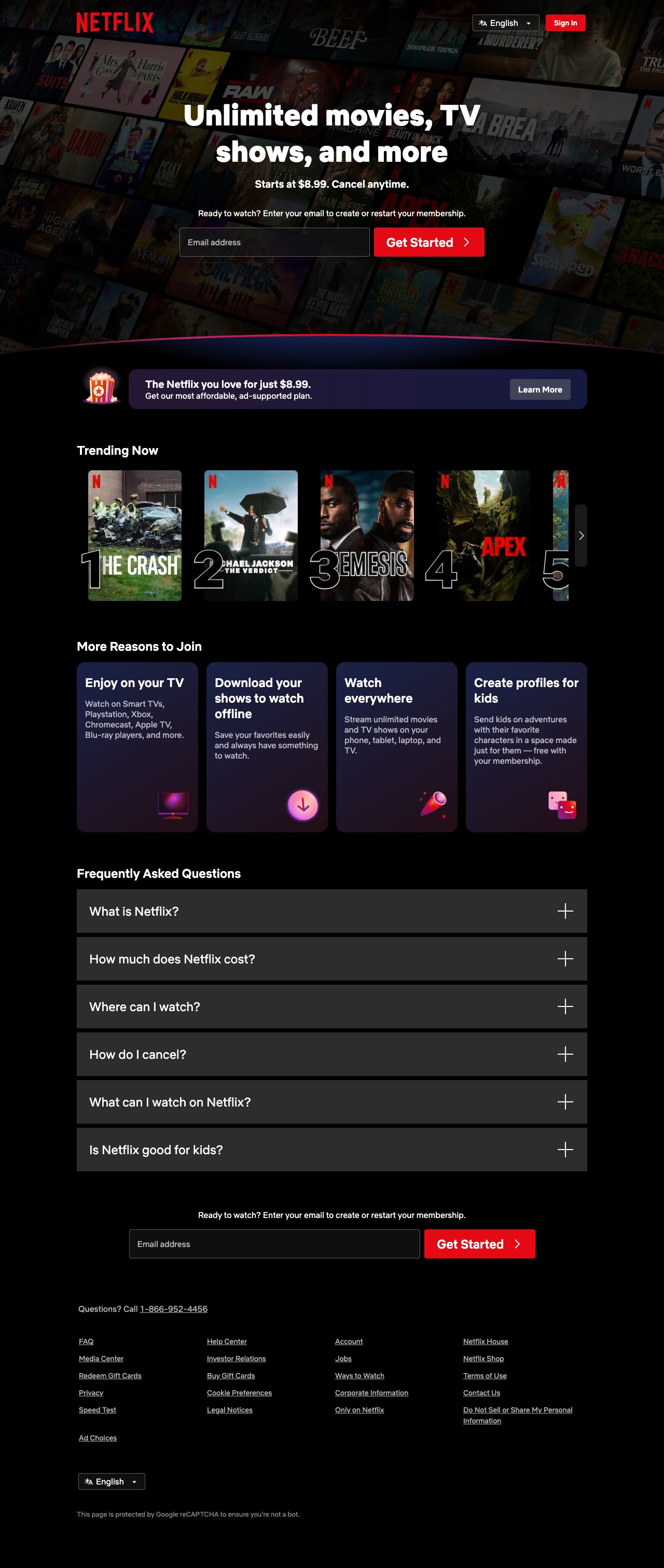
132sto decisionvs.4–6 weeks to reach stat sig
1,800+synthetic users tested
Design audited
Design under review
What our users said
17% engaged positively — strong visuals and low friction drive immediate action

The imagery pulls you in — all those show thumbnails feel like possibility. The low barrier to entry removes the scary part. I'd click the button right now.

66% would scroll — vague CTA and missing trial clarity stall decision momentum

The page design is visually appealing, but I'm staring at the email field wondering what happens next. Do I get charged immediately? Is there a trial? The button just says 'Get Started,' which tells me nothing.

17% would leave — absent cancellation details trigger trust concerns and abandonment

The FAQ mentions 'cancel anytime,' but I've been burned before by hidden fees. What does cancellation actually look like? Process? Timeline? I need specifics before committing.

What's working

These elements tested well — preserve them as you iterate.

Single email-field entry is the lowest possible signup barrier — no password, no payment details upfront, matching industry best practice for subscription funnels.
'Starts at $8.99. Cancel anytime.' in the hero answers cost and commitment fear in one line — the two biggest objections for subscription-hesitant users.
Four feature cards (TV, offline, multi-device, kids profiles) cover the broadest range of use cases, ensuring most demographic segments see a reason relevant to them.
Repeated CTA placement — hero and mid-page — captures both fast deciders and users who need to scroll through objections first.
How to make this design stronger

Here's what to fix first — then resubmit and we'll verify.

critical

Clarify what happens after 'Get Started' — immediately below the CTA button

Users stalling at the email field is the single most-cited hesitation in the reactions. A one-line explainer like 'No payment info needed yet — choose your plan next' directly below the red button would resolve this for the ~66% who are scrolling for reassurance before committing.

If you skip this: Ambiguity at the moment of action is a direct conversion killer — undecided users will exit rather than risk an unexpected charge.

Suggested fix
Add a single line of helper text directly below the 'Get Started >' button: 'No credit card required at this step.' in #FFFFFF at 13px, font-weight 400, centered, 8px margin-top from button bottom.
If a free trial exists, replace the above with: 'Start your free trial — no charge today.' Same styling.
Remove the second full email CTA section mid-page and replace with a single-line anchor link: 'Ready to start? →' that scrolls to the hero — reduces page length and scroll friction without losing the conversion hook.
A/B test helper text variants: 'No payment info needed yet' vs. 'Choose your plan after signup' to identify which framing lifts completion rate most.
recommended

Surface a condensed pricing tier comparison above the fold or immediately below the hero

Multiple reactions explicitly cite the missing pricing table as a blocker — users know three tiers exist (they found it in the FAQ) but can't compare them without hunting. A compact three-column table (Standard with Ads / Standard / Premium) placed between the hero and the ad-supported banner would serve the price-conscious segment, estimated at a meaningful share of the 66% who scroll past the hero.

If you skip this: Price-conscious users will exit to a comparison site or competitor rather than sign up blind — a recoverable loss that compounds over time.

Suggested fix
Insert a 3-column pricing table between the hero section and the ad-supported banner. Columns: 'Standard with Ads — $8.99', 'Standard — $X.XX', 'Premium — $X.XX'. Highlight the middle column with a #E50914 border and 'Most Popular' label.
Each column should list 3-4 key differentiators (resolution, simultaneous streams, downloads, ads) in a scannable bullet format — no more than 4 rows.
Keep the table width constrained to 860px max on desktop, full-width on mobile with horizontal scroll or stacked cards.
Link each column header to the full plan details page, not the signup flow — let users self-select before entering the funnel.
consider

Add a subscriber count or single trust stat near the hero CTA

The page carries zero social proof — no subscriber count, no ratings, no testimonials. For the undecided segment who aren't already Netflix-familiar, a single line like '300M+ members worldwide' near the email field would provide the external validation the design currently relies on brand recognition alone to supply.

Suggested fix
Add a single trust line above or below the email input: '300M+ members in 190 countries.' Font: #CCCCCC, 13px, centered.
Alternatively, place 3 micro-testimonial quotes (one line each, no attribution needed beyond first name + city) in a slim strip between the feature cards and FAQ sections.
Do not add star ratings or third-party review badges unless they are verified and current — unverifiable badges reduce trust rather than build it.
Test subscriber count stat first (lowest implementation cost) before investing in testimonial collection.
Compliance & Accessibility
Compliance3 flags
Incomplete Pricing Disclosure(Incomplete Subscription Pricing Disclosure)Only the entry-level $8.99 tier is shown in the hero. FTC guidelines on subscription services require clear disclosure of all pricing tiers before enrollment. Users who discover higher charges post-signup may dispute or chargeback.
Data Collection Consent Surfacing(Pre-Submission Data Collection Consent)The email field collects personal data before any explicit consent acknowledgment is shown. GDPR and CCPA require clear notice of data use at or before the point of collection — the reCAPTCHA notice at page bottom is insufficient for this purpose.
Cancellation Process Transparency(Subscription Cancellation Process Transparency)'Cancel anytime' is stated but the cancellation process, timeline, and any notice period are not disclosed on the page. FTC's 'Click-to-Cancel' rule (effective 2024) requires cancellation to be as easy as signup, with the process clearly described before enrollment.

Not legal advice — flags for your compliance team.

Accessibility3 notes
Hero Text Contrast On Mosaic BackgroundWhite subheading and body copy rendered over a semi-transparent mosaic of show thumbnails may fall below the WCAG 2.1 AA minimum contrast ratio of 4.5:1 depending on which thumbnail appears behind the text. Needs contrast audit across background image variants.
Collapsed FAQ Touch TargetsThe six FAQ expand buttons use '+' icons that likely fall below the WCAG 2.5.5 recommended 44×44px touch target minimum. Users with motor impairments may struggle to activate them on mobile.
Email Input Label VisibilityThe email input field appears to use placeholder text rather than a persistent visible label. Placeholder text disappears on focus, creating confusion for screen reader users and those with cognitive impairments — violates WCAG 1.3.1 (Info and Relationships).
Re-check after fixes

Fixed some issues? Check them off, upload your updated design, and we'll verify just these findings.

Save your work and unlock re-check

Sign up free →
Deeper analysis

For your VP, stakeholders, or anyone who wants the full picture.

Did this review help you improve your design?

Generated by Prior.Run — Know before you build.